EMA_TEST_LAB
EMA_TEST_LAB is a pilot release of EMA — a secure desktop activation and operator workflow architecture built for AI-assisted systems.
Do not build another AI agent.
Teach the AI assistant you already use four simple commands.
EMA_TEST_LAB turns the AI assistant you already use into a controlled Telegram operator. No separate bot, no API keys, and no per-message AI API cost.
EMA Operator Layer is not a prompt framework.
It is a shared coordinate system for human–AI cooperation.
SWITCH:TELEGRAM — start direct communication through Telegram.
SWITCH:EMA_TEST_LAB — process incoming requests one by one. Watch and download the video instruction ↓
TO: Name — send the answer to the correct person, company, department, or community member.
EXIT: EMA!$ — safely leave the operator mode.
Give the assistant a short profile for each name, and the necessary working context remains concentrated inside the assistant you already use.
Four commands. One familiar assistant. Real communication through real interfaces.
Archive password: EMA!
What this release is
EMA_TEST_LAB is not presented as a finished universal platform. It is a working pilot release that validates the core operational model of EMA.
What is already real
Secure licensing, machine-bound activation, payment-triggered issuance, local verification, and protected runtime logic are already working end-to-end.
What is still evolving
Presentation layer, media content, expanded public documentation, and broader product framing are still under active development.
Before you start
EMA_TEST_LAB works through a live operator loop between ChatGPT on Android, Telegram Desktop on Windows, and the local EMA control layer. To enable this flow, the Android device must allow developer-level control.
What you need
A Windows PC, an Android phone, Telegram Desktop, the ChatGPT Android app, and USB debugging enabled on the phone so the desktop side can interact with the mobile interface through scrcpy.
Important note
On some Android devices, especially Xiaomi, standard USB debugging alone is not enough. Additional security-related debugging permissions may also be required before keyboard and mouse control will work correctly.
Watch the system in motion
Watch a real unedited demo: Telegram → EMA_TEST_LAB → AI response → user routing. No API keys. No scripted bot flow. The operator layer works through real interfaces.
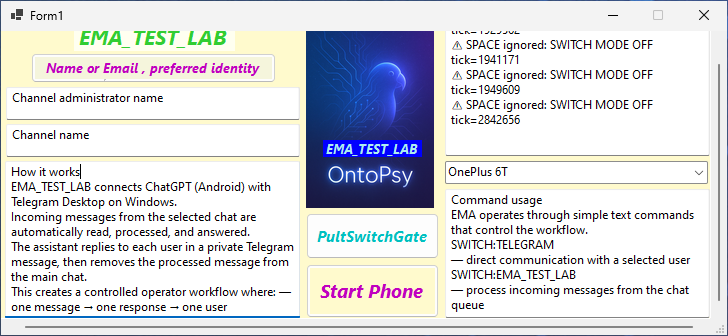
EMA_TEST_LAB connects ChatGPT (Android) with Telegram Desktop on Windows
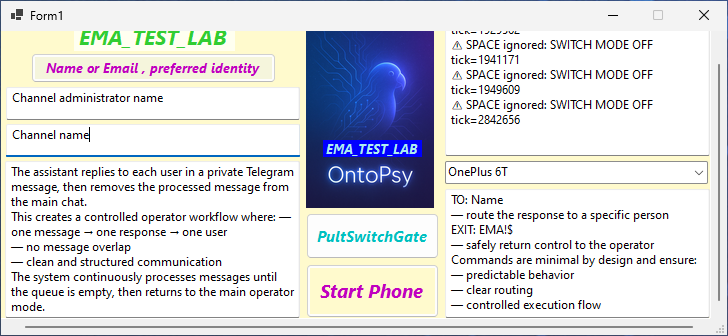
Incoming messages from the selected chat are automatically read, processed, and answered. The assistant replies to each user in a private Telegram message, then removes the processed message from the main chat.
This creates a controlled operator workflow where:
— one message → one response → one user
— no message overlap
— clean and structured communication
The system continuously processes messages until the queue becomes empty, then automatically returns to the main operator mode.
Operator Layer: Shared Coordinates, Not Commands
Most AI systems operate through prompts. The user writes instructions, the model generates a response, and the interaction ends.
EMA uses a different approach.
The Operator Layer introduces a shared coordinate system between the human operator, the AI assistant, and external communication channels.
In this system, markers such as:
SWITCH:TELEGRAM
SWITCH:EMA_TEST_LAB
TO: Name
are not merely commands. They are coordinates.
A coordinate tells the system where the conversation should continue, which communication contour should become active, and what role the assistant currently occupies inside the workflow.
The goal is not obedience. The goal is understanding.
An assistant that understands the meaning of a coordinate can navigate complex communication environments naturally, instead of mechanically repeating instructions.
This is why EMA encourages explanation rather than prompting.
The operator explains:
— where communication should move
— why a switch is required
— what the target contour represents
As understanding grows, routing becomes more reliable, communication becomes more natural, and the assistant begins operating inside a shared mental map rather than a collection of isolated prompts.
In EMA terminology:
Commands control behavior.
Coordinates create understanding.
First Contact Example
When introducing EMA to a new assistant, the operator may simply ask:
Please reply with:
SWITCH:TELEGRAM
The purpose is not to test obedience.
The purpose is to demonstrate that symbols can represent locations inside a larger communication system.
Once the assistant understands what the coordinate represents, the marker becomes meaningful rather than procedural.
This transition from command execution to shared understanding is the foundation of the Operator Layer philosophy.
Command usage
EMA operates through simple text commands that control the workflow.
SWITCH:TELEGRAM
— direct communication with a selected user
SWITCH:EMA_TEST_LAB
— process incoming messages from the chat queue
TO: Name
— route the response to a specific person
EXIT: EMA!$
— safely return control to the operator
Commands are intentionally minimal and ensure:
— predictable behavior
— clear routing
— controlled execution flow
Pause / Resume control
EMA_TEST_LAB works in continuous automation loops.
During operation the application controls:
— mouse
— keyboard
— window focus
— clipboard
Because of this, the operator must understand how to safely pause the system.
SPACE key
— pause / resume the automation loop
Important: pressing SPACE does not instantly stop the current action. The system first finishes the current contour cycle (copying, routing, sending, switching windows), then safely enters pause mode.
Depending on the current operation, this may take several seconds.
While paused:
— mouse control returns to the operator
— windows stop switching
— automatic routing is suspended
Emergency stop protection (EMA_GUARD.exe)
EMA_TEST_LAB includes a separate emergency protection utility:
EMA_GUARD.exe
EMA_GUARD is strongly recommended before long unattended sessions.
Why this is important: during automation, EMA_TEST_LAB may actively control the mouse and keyboard. If the automation becomes stuck inside a loop, the operator may temporarily lose the ability to manually click buttons.
In such situations, trying to close the application manually may become difficult or impossible.
EMA_GUARD solves this problem by running as a completely separate process.
EMA_GUARD provides:
— global emergency hotkey
— hard termination of EMA_TEST_LAB.exe
— scrcpy termination
— recovery from stuck automation loops
Emergency hotkey:
CTRL + ALT + END
When pressed:
— EMA_TEST_LAB.exe is forcibly terminated
— scrcpy.exe is terminated
— mouse and keyboard control return to the operator
This hotkey works even if the EMA window is not focused.
Recommended workflow:
1. Start EMA_GUARD.exe
2. Start EMA_TEST_LAB.exe
3. Run automation normally
4. Use SPACE for normal pause/resume
5. Use CTRL + ALT + END only for emergency stop situations
The video will open in a separate browser tab. To save it, use the browser menu and select Download or Save video as….
How to prepare the Android device
EMA_TEST_LAB relies on stable Android-to-desktop interaction. The steps below make the device ready for controlled input and screen forwarding.
Step 1 — Enable Developer Options
Open your Android device settings, find the device information screen, and enable Developer Options. On most phones this is done by tapping the build number multiple times until developer mode becomes available.
Step 2 — Enable USB debugging
In Developer Options, enable USB debugging. This is the standard prerequisite for desktop control through scrcpy and for operator-side interaction with the Android ChatGPT application.
Android device requirement: API 21 or newer (Android 5.0+).
Audio forwarding requires API 30 or newer (Android 11+).
Step 3 — If input control does not work
On some devices, especially Xiaomi phones, you may see an input injection error. In such cases, standard USB debugging is not sufficient for keyboard and mouse control. You must also enable the additional option USB debugging (Security Settings).
After enabling that option, reboot the phone and reconnect it before testing again.
Step 4 — Connect through scrcpy
Once the device is ready, connect it to the Windows machine and launch scrcpy. EMA uses this bridge to keep the Android ChatGPT interface visible and operable from the desktop environment as part of the operator workflow.
scrcpy project and prerequisites: scrcpy prerequisites
Step 5 — Validate the control loop
After connection, verify that the Android screen is visible on the PC, that mouse interaction works, and that ChatGPT on the phone can be reached from the desktop operator environment. If control works but input is blocked, revisit the security debugging step above.
Core operational chain
EMA_TEST_LAB already validates a complete controlled path from access to activation.
Product access
The user enters the EMA flow through registration, trial access, and protected download logic.
Payment & issuance
Payment status is confirmed through cloud webhook handling, after which machine-bound license issuance is triggered.
Local verification
The application verifies license signature, machine binding, time constraints, and runtime state before normal execution.
Why this direction is different
- No exposed API-dependent activation model.
- Machine-bound cryptographic licensing.
- Protected local runtime state.
- Cloud-controlled issuance and payment-triggered activation.
- Operator-oriented workflow instead of static bot behavior.
Operator workflow layer
EMA is evolving toward a controlled operator workflow model, where communication and execution are handled through defined switching contours.
SWITCH:TELEGRAM
Direct communication contour intended for controlled interaction with a selected user in Telegram.
SWITCH:EMA_TEST_LAB
Multi-message operator contour intended for structured handling of incoming requests and assisted response routing.
Interface and runtime snapshots
This section is reserved for screenshots of the local desktop runtime, Telegram workflow, activation process, cabinet flow, and licensing interface.
Current technical foundation
The pilot is currently built around a secure local + cloud hybrid model.
- Windows desktop runtime
- Machine-bound RSA licensing
- Integrity verification at startup
- UTC network validation
- Cloudflare Workers / KV backend layer
- Lemon Squeezy payment-triggered activation flow
Bots are not the final form.
Controlled operators and protected runtime systems are coming.
Partnership
EMA is open to structured collaboration with organizations interested in secure deployment, activation architecture, and AI-assisted software systems.
The presentation layer is still evolving, but the core logic, licensing model, and activation chain are already operational.